Motivation#
We wanted to set up a lightweight HTTPS server on an internal company network without purchasing a certificate from a public CA. The solution: build our own private Certificate Authority (CA) and issue a self-signed certificate.
TLS Handshake Overview#
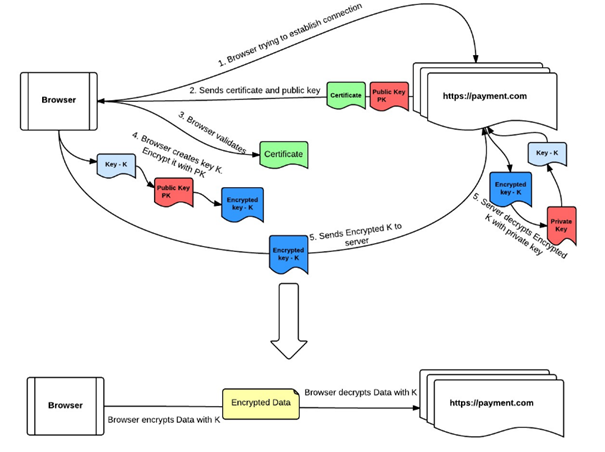
- The browser connects to
https://demowebsite.com. - The server returns its certificate (containing the server’s public key).
- The browser verifies the certificate against a trusted CA.
- The browser generates a random symmetric key K and encrypts it with the server’s public key.
- The server decrypts K using its private key — both sides now share K.
- All subsequent traffic is encrypted with K.
Setting Up a Root CA#
Best practice: the root CA never signs end-entity certificates directly. Instead it signs an intermediate CA, whose key is used for day-to-day issuance. The root key can then be kept offline.
1. Prepare the Directory Structure#
1
2
3
4
5
6
| mkdir -p /root/ca
cd /root/ca
mkdir certs crl newcerts private
chmod 700 private
touch index.txt serial
echo 1000 > serial
|
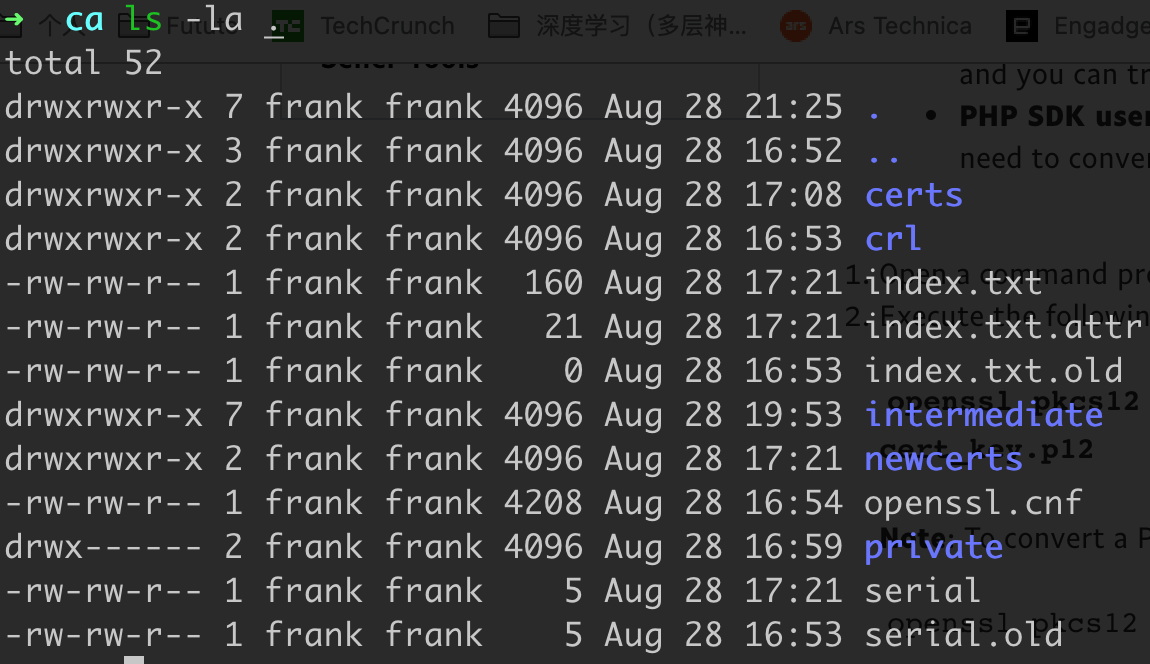
Prepare the openssl.cnf configuration file for the root CA.
2. Generate the Root Key#
1
2
3
| cd /root/ca
openssl genrsa -aes256 -out private/ca.key.pem 4096
chmod 400 private/ca.key.pem
|
3. Create the Root Certificate#
1
2
3
4
5
6
| cd /root/ca
openssl req -config openssl.cnf \
-key private/ca.key.pem \
-new -x509 -days 7300 -sha256 -extensions v3_ca \
-out certs/ca.cert.pem
chmod 444 certs/ca.cert.pem
|
4. Verify the Root Certificate#
1
| openssl x509 -noout -text -in certs/ca.cert.pem
|
1. Prepare the Directory Structure#
1
2
3
4
5
6
| mkdir /root/ca/intermediate
cd /root/ca/intermediate
mkdir certs crl csr newcerts private
chmod 700 private
touch index.txt serial crlnumber
echo 1000 > serial
|
Prepare openssl-intermediate.cnf.
1
2
3
4
| cd /root/ca
openssl req -config intermediate/openssl-intermediate.cnf -new -sha256 \
-key intermediate/private/intermediate.key.pem \
-out intermediate/csr/intermediate.csr.pem
|
1
2
3
4
5
6
| cd /root/ca
openssl ca -config openssl.cnf -extensions v3_intermediate_ca \
-days 3650 -notext -md sha256 \
-in intermediate/csr/intermediate.csr.pem \
-out intermediate/certs/intermediate.cert.pem
chmod 444 intermediate/certs/intermediate.cert.pem
|
1
2
3
4
5
6
| # Inspect the certificate
openssl x509 -noout -text -in intermediate/certs/intermediate.cert.pem
# Verify it against the root
openssl verify -CAfile certs/ca.cert.pem \
intermediate/certs/intermediate.cert.pem
|
Building the Certificate Chain#
Clients that trust the root CA also need to verify the intermediate CA. Concatenate both certificates into a chain file:
1
2
3
| cat intermediate/certs/intermediate.cert.pem \
certs/ca.cert.pem > intermediate/certs/ca-chain.cert.pem
chmod 444 intermediate/certs/ca-chain.cert.pem
|
Issuing a Server Certificate#
1. Generate the Server Key#
1
2
3
4
| cd /root/ca
openssl genrsa -aes256 \
-out intermediate/private/www.example.com.key.pem 2048
chmod 400 intermediate/private/www.example.com.key.pem
|
2. Create a Certificate Signing Request (CSR)#
1
2
3
4
| cd /root/ca
openssl req -config intermediate/openssl.cnf \
-key intermediate/private/www.example.com.key.pem \
-new -sha256 -out intermediate/csr/www.example.com.csr.pem
|
3. Sign the Server Certificate#
1
2
3
4
5
6
| cd /root/ca
openssl ca -config intermediate/openssl.cnf \
-extensions server_cert -days 375 -notext -md sha256 \
-in intermediate/csr/www.example.com.csr.pem \
-out intermediate/certs/www.example.com.cert.pem
chmod 444 intermediate/certs/www.example.com.cert.pem
|
4. Verify the Server Certificate#
1
2
3
4
5
6
| openssl x509 -noout -text \
-in intermediate/certs/www.example.com.cert.pem
# Verify against the full chain
openssl verify -CAfile intermediate/certs/ca-chain.cert.pem \
intermediate/certs/www.example.com.cert.pem
|
Files to Deploy on the Server#
1
2
3
| ca-chain.cert.pem
www.example.com.key.pem
www.example.com.cert.pem
|
Verifying the Certificate#
1
2
3
4
5
6
| # Show the server's full certificate chain
openssl s_client -connect localhost:443 -prexit -showcerts
# Verify the leaf cert is signed by your root CA
openssl verify -verbose -x509_strict \
-CAfile ca-chain.cert.pem localhost.cert.pem
|
Using the Certificate in Code#
Tornado (Python) HTTPS Server#
 1
 2
 3
 4
 5
 6
 7
 8
 9
10
11
12
13
14
15
16
17
18
19
20
21
22
23
| # Note: ssl_options must include the certificate chain, not just the leaf cert.
import ssl
import tornado.httpserver
import tornado.ioloop
import tornado.web
class MainHandler(tornado.web.RequestHandler):
def get(self):
self.write("Hello, world")
def make_app():
return tornado.web.Application([(r"/", MainHandler)])
if __name__ == "__main__":
application = make_app()
ssl_ctx = ssl.create_default_context(
ssl.Purpose.CLIENT_AUTH,
cafile="./ca-chain.cert.pem"
)
ssl_ctx.load_cert_chain("./localhost.cert.pem", "./localhost.key.pem")
http_server = tornado.httpserver.HTTPServer(application, ssl_options=ssl_ctx)
http_server.listen(443)
tornado.ioloop.IOLoop.current().start()
|
Making Requests with a Password-Protected Key (Python)#
 1
 2
 3
 4
 5
 6
 7
 8
 9
10
11
12
13
14
15
16
17
18
19
20
21
22
23
24
25
26
27
28
| import requests
from urllib3.util.ssl_ import create_urllib3_context
from requests.adapters import HTTPAdapter
import urllib3
urllib3.disable_warnings(urllib3.exceptions.InsecureRequestWarning)
cert_path = "./localhost.cert.pem"
private_key_path = "./localhost.key.pem"
passphrase_key = "your-key-passphrase"
class SSLAdapter(HTTPAdapter):
def init_poolmanager(self, *args, **kwargs):
context = create_urllib3_context()
context.load_cert_chain(
certfile=cert_path,
keyfile=private_key_path,
password=passphrase_key
)
kwargs['ssl_context'] = context
return super().init_poolmanager(*args, **kwargs)
session = requests.Session()
session.verify = False # Skip server cert validation for self-signed certs
session.mount("https://", SSLAdapter())
response = session.post("https://localhost:20191/inference")
print(response.json())
|
Testing in a Browser#
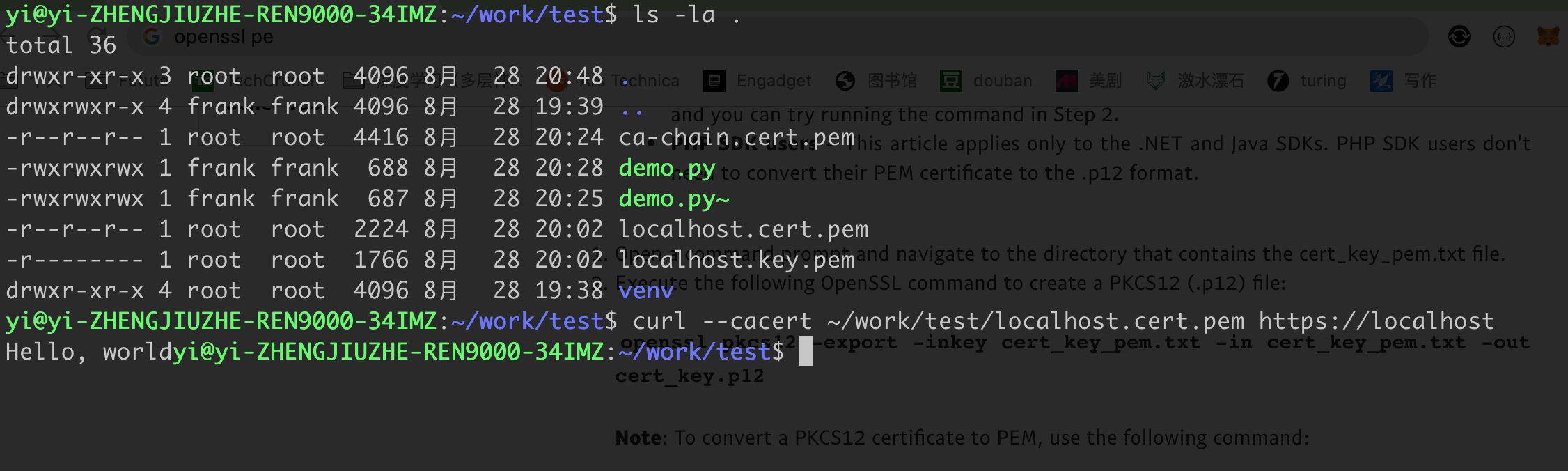
- Firefox has a built-in certificate manager — you can import your root CA directly without format conversion.
- Chrome requires importing the root CA into the OS keychain (Keychain Access on macOS).
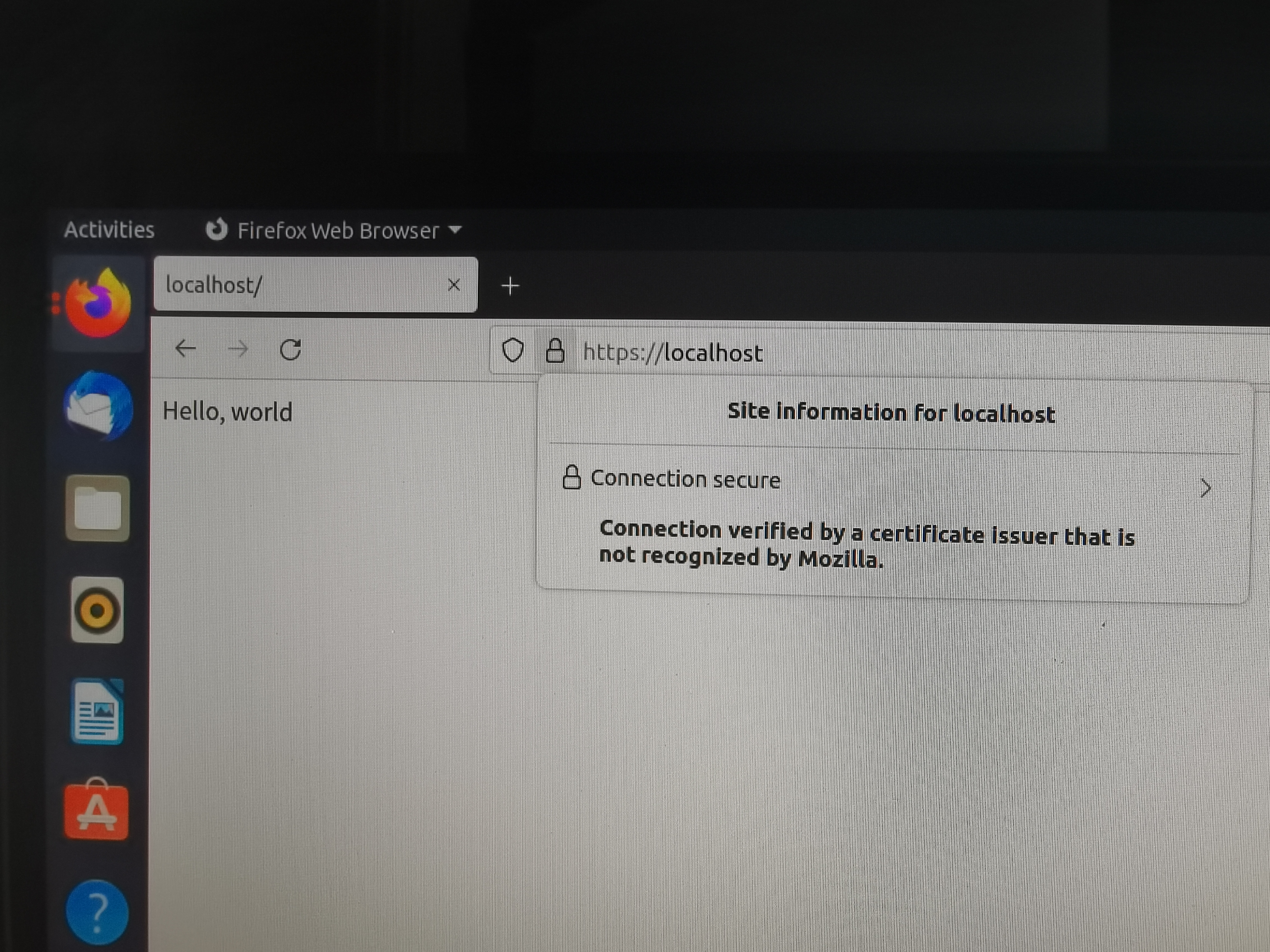
Result after importing:
Summary#
This post covers the core steps for building a private CA and issuing self-signed certificates. Topics not covered here but worth exploring:
- Certificate revocation (CRL / OCSP)
- Format conversion (PEM ↔ DER ↔ PKCS#12)
- Choosing the right encryption algorithm
- Best practice: automate certificate issuance and renewal inside your CI/CD pipeline with scheduled rotation jobs.