Task 3. VaR Backtesting

VaR Backtesting

  • most of the time, we assume daily return follow normal distribution and as the question say, Var is caculated at 99% confidence.

Import Libraries

1
await __import__("piplite").install('numpy', 'scipy', 'matplotlib', 'pandas', 'tabulate')
1
2
# hyy:fix the import failed issue
await __import__("piplite").install('tabulate')
1
2
# hyy:fix excel issue, miss the excel read library, install here.
await __import__("piplite").install('openpyxl')
1
2
3
4
5
import numpy as np
import pandas as pd
from scipy import stats
import matplotlib.pyplot as plt
from tabulate import tabulate
1
2
# set precision
pd.set_option('display.precision', 4)

Load Data

1
2
3
4
5
6
7
8
# hyy: in order to save time, load from excel via pandas is easier.
df = pd.read_excel('./res/Indices_Download_2026.xlsx')
df['Date'] = pd.to_datetime(df['Date'])
df = df.set_index('Date')
df_filtered = df.loc['2025-01-01':'2026-01-15'].copy()
sp500 = df_filtered['^GSPC'].dropna()
# take a look at the data is right or not.
sp500.head()
1
2
3
4
5
6
7
Date
2025-01-02    5868.5498
2025-01-03    5942.4702
2025-01-06    5975.3799
2025-01-07    5909.0298
2025-01-08    5918.2500
Name: ^GSPC, dtype: float64

Data Operation

 1
 2
 3
 4
 5
 6
 7
 8
 9
10
11
12
13
14
15
16
17
18
19
20
21
22
23
24
25
26
27
28
29
30
31
32
33
# hyy: caculate the daily return first
d_rtns = np.log(sp500 / sp500.shift(1)).dropna()

# rolling standard deviation
r_std = d_rtns.rolling(window=21).std()
# the 10D VaR

# hyy: just take a test for different cofidence_level and check the result.
# set CONFIDENCE_LEVEL 0.99, FACTOR = 2.33
# but we also test 0.95 and 0.9, FACTOR should be 1.645 and 1.28 in below.
# i take a test, when change to 0.95, bleach number 15, zone is GREEN, when change to 0.9, bleach number 16, zone is GREEN too.
# lower confidence level -> higher quantile -> more breaches
# this seems like if the confidence_level is 0.9,which is smaller than 0.99,it should have more breach point, make sense!
var_10d = -2.33 * r_std * np.sqrt(10)

# forward 10D returns
f_10_ret = np.log(sp500.shift(-10) / sp500)

# Create analysis dataframe
a_df = pd.DataFrame({
    'Close': sp500,
    'Rolling_Std': r_std,
    'VaR_10D': var_10d,
    'Forward_10D': f_10_ret
})

# Remove NaN values
a_df = a_df.dropna()

# check is breaches or not
a_df['Breach'] = (a_df['Forward_10D'] < a_df['VaR_10D']).astype(int)

a_df.head()
1
2
3
4
5
6
7
                Close  Rolling_Std  VaR_10D  Forward_10D  Breach
Date                                                            
2025-02-04  6037.8799       0.0089  -0.0657       0.0174       0
2025-02-05  6061.4800       0.0086  -0.0631       0.0092       0
2025-02-06  6083.5698       0.0085  -0.0628      -0.0116       0
2025-02-07  6025.9902       0.0084  -0.0620      -0.0071       0
2025-02-10  6066.4399       0.0085  -0.0627      -0.0185       0

(a) VaR Breach Statistics

 1
 2
 3
 4
 5
 6
 7
 8
 9
10
# Calculate breach statistics
breach_count = a_df['Breach'].sum()
total_comparisons = len(a_df)
breach_percentage = breach_count / total_comparisons * 100
# hyy: just take a test for different cofidence_level and check the result.
# try 0.9 and 0.95 for a quick check
# expected_breaches = total_comparisons * (1 - 0.9)
# expected_breaches = total_comparisons * (1 - 0.95)
expected_breaches = total_comparisons * (1 - 0.99)
print("Total Comparisons:", total_comparisons, "Number of Breaches:", breach_count, "Breach Percentage:", breach_percentage, "%, Expected Breaches:", expected_breaches)
1
Total Comparisons: 229 Number of Breaches: 10 Breach Percentage: 4.366812227074235 %, Expected Breaches: 2.290000000000002

(b) Visualization

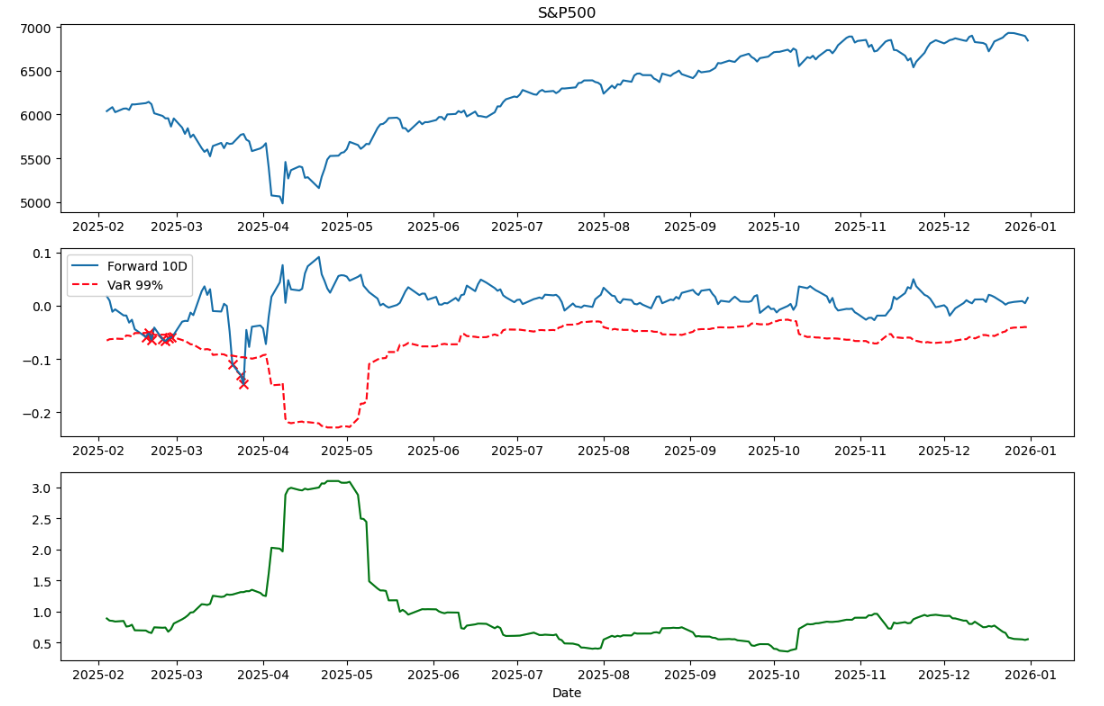
Plot showing VaR breaches (marked with crosses)
 1
 2
 3
 4
 5
 6
 7
 8
 9
10
11
12
13
14
15
16
17
18
19
20
21
22
23
24
25
26
27
28
29
30
31
32
33
# Create the plot one by one
# fig, axes = plt.subplots(3, 1, figsize=(14, 10), sharex=True)
# fig.suptitle('S&P500 Analysis (2025-01-01 to 2026-01-15)', fontsize=14, fontweight='bold')

# S&P Price
# ax = axes[0]
# ax.plot(a_df.index, a_df['Close'], 'b-', linewidth=1)
# ax.set_ylabel('Price')
# ax.set_title('S&P500 Price')
# ax.legend(loc='upper left')
# ax.grid(True, alpha=0.3)

# make them together seems better.
fig, (apx, ret_val, vol_val) = plt.subplots(3, 1, figsize=(12, 8))

# price
apx.plot(a_df.index, a_df['Close'])
apx.set_title('S&P500')

# return and VaR
breach_dates = a_df[a_df['Breach'] == 1].index
breach_values = a_df.loc[breach_dates, 'Forward_10D']
ret_val.plot(a_df.index, a_df['Forward_10D'], label='Forward 10D')
ret_val.plot(a_df.index, a_df['VaR_10D'], 'r--', label='VaR 99%')
ret_val.scatter(breach_dates, breach_values, c='red', marker='x', s=50)
ret_val.legend()

# volatility
vol_val.plot(a_df.index, a_df['Rolling_Std'] * 100, 'g')
vol_val.set_xlabel('Date')

plt.tight_layout()
plt.show()

Task 3. VaR Backtesting figure

(c) Traffic-Light Zones

 1
 2
 3
 4
 5
 6
 7
 8
 9
10
11
12
13
14
15
16
17
18
19
20
21
22
23
24
# Calculate binomial percentiles
n_trials = total_comparisons

# hyy: just take a test for different cofidence_level and check the result.
# when i change confidence to 0.95 and 0.9, p_breach also need to change to 0.05 and 0.1 as well
# p_breach = 0.05 
# p_breach = 0.1
p_breach = 0.01

q_pG = stats.binom.ppf(0.95, n_trials, p_breach)
q_pY = stats.binom.ppf(0.9999, n_trials, p_breach)
print(q_pG)
print(q_pY)

# Determine zone
if breach_count <= q_pG:
    zone = "GREEN"
elif breach_count <= q_pY:
    zone = "YELLOW"
else:
    zone = "RED"

# Output results
print("Breaches:", breach_count, "Zone:", zone)
1
2
3
5.0
10.0
Breaches: 10 Zone: YELLOW
1
print(f"Period: 2025-02-04 to 2025-12-31, Total Comparisons: {total_comparisons}, Breach Count: {breach_count}, Breach Rate: {breach_percentage:}%, Traffic Light Zone: {zone}")
1
Period: 2025-02-04 to 2025-12-31, Total Comparisons: 229, Breach Count: 10, Breach Rate: 4.366812227074235%, Traffic Light Zone: YELLOW

Task 4. EWMA Volatility Forecast for VaR Backtesting

Task 4: EWMA Volatility Forecast for VaR Backtesting

  • 99% VaR, 10-day horizon, normal assumption

Import Libraries

1
2
3
4
5
6
await __import__("piplite").install('numpy')
await __import__("piplite").install('scipy')
await __import__("piplite").install('matplotlib')
await __import__("piplite").install('pandas')
await __import__("piplite").install('tabulate')
await __import__("piplite").install('openpyxl')
1
2
3
4
5
import numpy as np
import pandas as pd
from scipy import stats
import matplotlib.pyplot as plt
from tabulate import tabulate
1
pd.set_option('display.precision', 4)

Load Data

 1
 2
 3
 4
 5
 6
 7
 8
 9
10
11
# hyy: Using pandas to load Excel directly
df = pd.read_excel('./res/Indices_Download_2026.xlsx')
df['Date'] = pd.to_datetime(df['Date'])
df = df.set_index('Date')

# filter data
df_filtered = df.loc['2025-01-01':'2026-01-15'].copy()
sp500 = df_filtered['^GSPC'].dropna()
print(f"Data loaded: {len(sp500)} observations from {sp500.index[0]} to {sp500.index[-1]}")
# take a look at the data
sp500.head()
1
2
3
4
5
6
7
8
9
Data loaded: 260 observations from 2025-01-02 00:00:00 to 2026-01-15 00:00:00

Date
2025-01-02    5868.5498
2025-01-03    5942.4702
2025-01-06    5975.3799
2025-01-07    5909.0298
2025-01-08    5918.2500
Name: ^GSPC, dtype: float64

Data Preprocessing

 1
 2
 3
 4
 5
 6
 7
 8
 9
10
11
12
13
14
15
16
17
18
19
20
21
22
23
24
25
26
27
28
29
30
31
32
33
34
35
36
37
38
39
40
41
42
43
44
# daily log returns
d_ret = np.log(sp500 / sp500.shift(1)).dropna()

# Calculate EWMA volatility
init_var = d_ret.var()

ewma_var = np.zeros(len(d_ret))

ewma_var[0] = init_var

for t in range(1, len(d_ret)):
    ewma_var[t] = 0.72 * ewma_var[t-1] + (1 - 0.72) * (d_ret.iloc[t] ** 2)

# Convert to volatility
ewma_vol = np.sqrt(ewma_var)

# Create series
ewma_ser = pd.Series(ewma_vol, index=d_ret.index, name='EWMA_Volatility')

# Calculate 10D VaR
var_10d = -2.33 * ewma_ser * np.sqrt(10)
var_10d.name = 'VaR_10D'

# forward 10D returns
for_rets = np.log(sp500.shift(-10) / sp500)
for_rets.name = 'Forward_10D'

a_df = pd.DataFrame({
    'Close': sp500,
    'EWMA_Volatility': ewma_ser,
    'VaR_10D': var_10d,
    'Forward_10D': for_rets
})

# NaN filter
a_df = a_df.dropna()

# Identify breaches
a_df['Breach'] = (a_df['Forward_10D'] < a_df['VaR_10D']).astype(int)

print(f"Analysis period: {a_df.index[0]} to {a_df.index[-1]}")
print(f"Total observations: {len(a_df)}")
# hyy: check some data to verify
# a_df.head()
1
2
Analysis period: 2025-01-03 00:00:00 to 2025-12-31 00:00:00
Total observations: 249

(a) VaR Breach Statistics

1
2
3
4
5
6
breach_count = int(a_df['Breach'].sum())
total_comparisons = len(a_df)
breach_percentage = breach_count / total_comparisons * 100
expected_breaches = total_comparisons * (1 - 0.99)

print(f"Total Comparisons: {total_comparisons}, Number of Breaches: {breach_count}, Breach Percentage: {breach_percentage}%, Expected Breaches: {expected_breaches}")
1
Total Comparisons: 249, Number of Breaches: 11, Breach Percentage: 4.417670682730924%, Expected Breaches: 2.490000000000002

Traffic-Light Zones

 1
 2
 3
 4
 5
 6
 7
 8
 9
10
11
12
13
14
15
n_trials = total_comparisons
p_breach = 0.01

q_pG = stats.binom.ppf(0.95, n_trials, p_breach)
q_pY = stats.binom.ppf(0.9999, n_trials, p_breach)

if breach_count <= q_pG:
    zone = "GREEN"
elif breach_count <= q_pY:
    zone = "YELLOW"
else:
    zone = "RED"

print("Breaches:", breach_count)
print("Zone:", zone)
1
2
Breaches: 11
Zone: RED

(b) Visualization

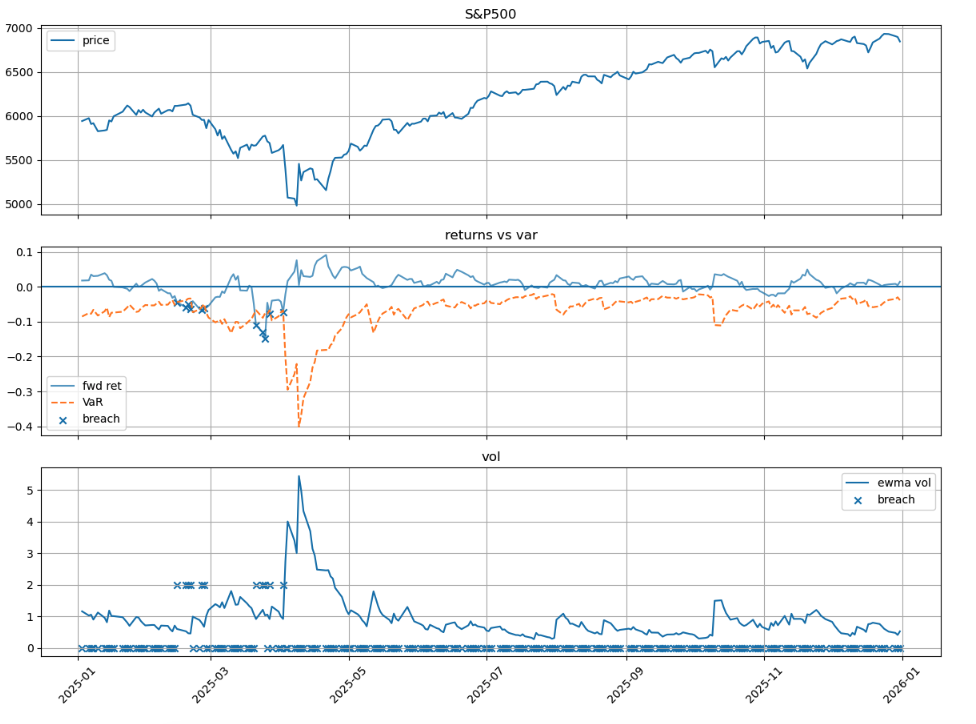
Plot showing VaR breaches (marked with crosses)

Task 4. EWMA Volatility Forecast for VaR Backtesting figure

 1
 2
 3
 4
 5
 6
 7
 8
 9
10
11
12
13
14
15
16
17
18
19
20
21
22
23
24
25
26
27
28
29
30
31
32
33
34
35
36
37
38
fig, axes = plt.subplots(3, 1, figsize=(12, 9), sharex=True)

# ---hyy: price ---
ax = axes[0]
ax.plot(a_df.index, a_df['Close'], label='price')
ax.set_title('S&P500')
ax.legend()
ax.grid(True)

# --- hyy: returns vs var ---
ax = axes[1]
ax.plot(a_df.index, a_df['Forward_10D'], label='fwd ret', alpha=0.7)
ax.plot(a_df.index, a_df['VaR_10D'], '--', label='VaR')
ax.axhline(0)

# breach points
bd = a_df[a_df['Breach'] == 1]
ax.scatter(bd.index, bd['Forward_10D'], marker='x', label='breach')

ax.set_title('returns vs var')
ax.legend()
ax.grid(True)

# --- ewma vol ---
ax = axes[2]
vol = a_df['EWMA_Volatility'] * 100
ax.plot(a_df.index, vol, label='ewma vol')

# hyy: mark breach
ax.scatter(a_df.index, a_df['Breach'] * 2, marker='x', label='breach')

ax.set_title('vol')
ax.legend()
ax.grid(True)

plt.xticks(rotation=45)
plt.tight_layout()
plt.show()
1
<Figure size 1200x900 with 3 Axes>

(c) Comparison of Three Approaches

As discussed in the lecture, we know the pros and cons of these three method.

  • Historical Simulation: Does not depend on distributional assumptions; can capture heavy tails; But the rolling window length is a critical factor.
  • Rolling SD: Provides stable estimates but is slow to adapt to structural changes in volatility.
  • EWMA: Responds quickly to new information, but the results depend on the decay factor λ.

What figure above tell us:

  • common part: the breach events in Figure 2 clearly cluster during the market downturn visible in Figure 1 (around March-April 2025),This pattern confirms that all three methods respond to heightened market risk, but with different speeds.
  • Rolling SD the Rolling SD method (which I implemented in Task 3) responded more slowly. I observed that when extreme returns exited the 21-day window around late March, the volatility estimate dropped suddenly—giving a false sense of calm
  • Historical Simulation would face a similar lag: it needs extreme returns to enter AND fill the window before risk estimates fully adjust, typically requiring 2-3 weeks.
  • EWMA My volatility plot (Figure 3) shows EWMA volatility jumping from about 1% to over 5% during the April 2025 stress period, offers the best adaptability for risk management during stress periods, despite its normal distribution assumption. Rolling SD sits awkwardly in the middle—slower than EWMA but without the distribution-free benefit of Historical Simulation

From my opinion:

When choosing a method for risk management, the decision depends on the use case:

  • For real-time risk monitoring during volatile periods, EWMA is preferable due to its fast response.
  • For regulatory reporting where stability matters, Historical Simulation might be more appropriate.
  • Rolling SD, while conceptually simple, offers limited advantages in either scenario.